Understanding your benefits
You may have received a pension benefit statement from The Pearson Pension Plan (the Plan).
The statement will show the value of any Defined Contribution (DC) or Additional Voluntary Contributions (AVCs) you hold in the Plan. We will also show any active Defined Benefit (DB) pension benefits.
The statements help to give you an idea of what benefits you may have when you reach your normal or selected retirement age.
The Trustee, in line with regulations, has produced the following documents. Just click on each line to read more:
- The Statement of Investment Principles Sep 2025 (SIP) (PDF 360KB) which explains the investment principles the Trustee applies.
- An Implementation statement 2024 (PDF 266KB) which specifies how the Trustee has implemented the SIP.
- Chair’s statement 2025 (PDF 311KB) which details the effect of costs and charges on the Plan’s defined contribution arrangements.
- The Trustee’s Climate change report 2025 (PDF 1.6MB).
To support your annual benefit statement to help you make the most of your pension benefits, here are additional links to:
Your pension benefit statement explained
To get the most out of your statement, simply choose the example below that matches your statement layout, and move your mouse over the highlighted areas to see an explanation of the terms used.
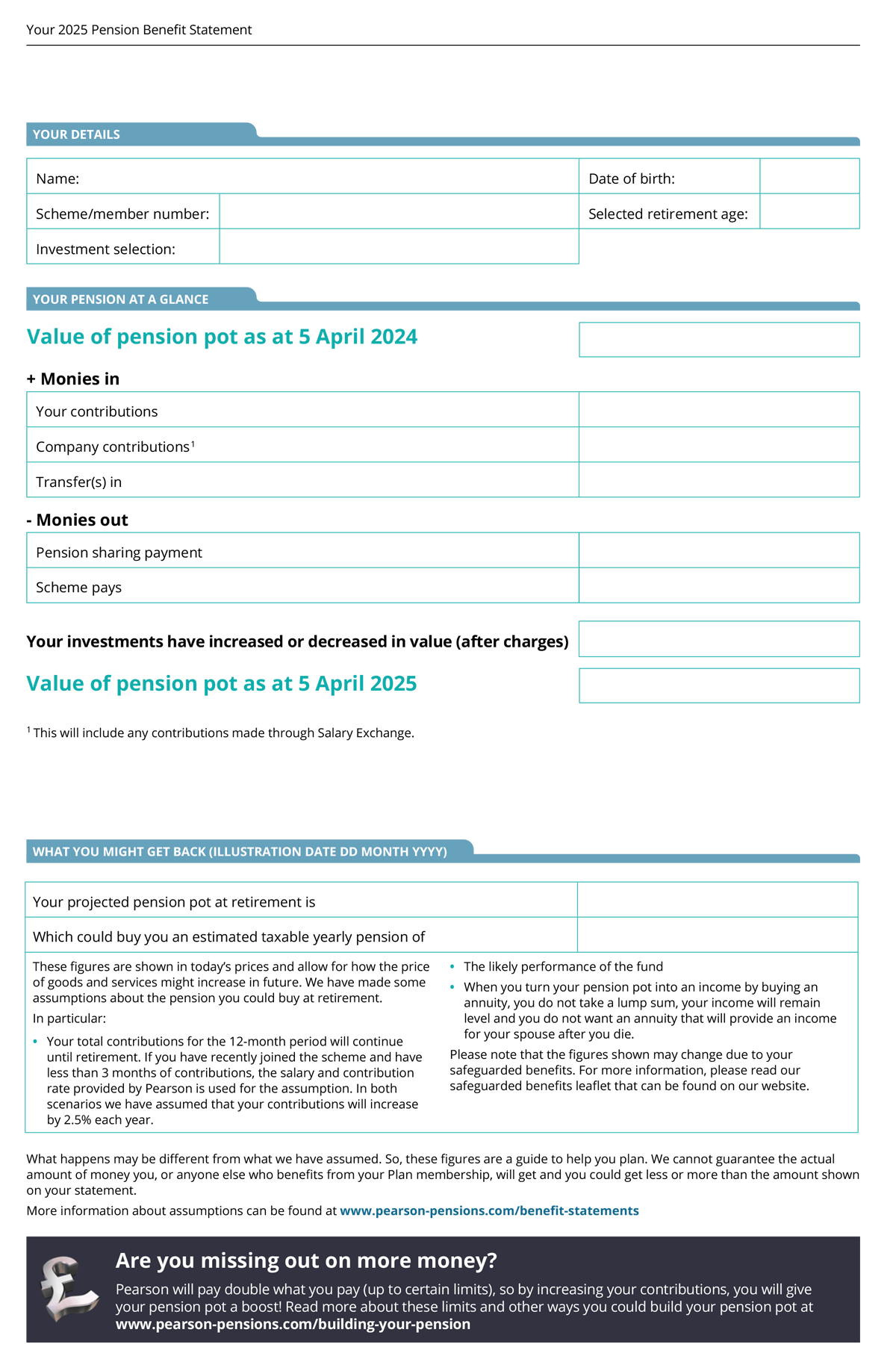 Selected retirement ageChange in value of investmentsYour employer has addedYour project pension pot at retirementWhich could buy you an estimate taxable yearly pension of
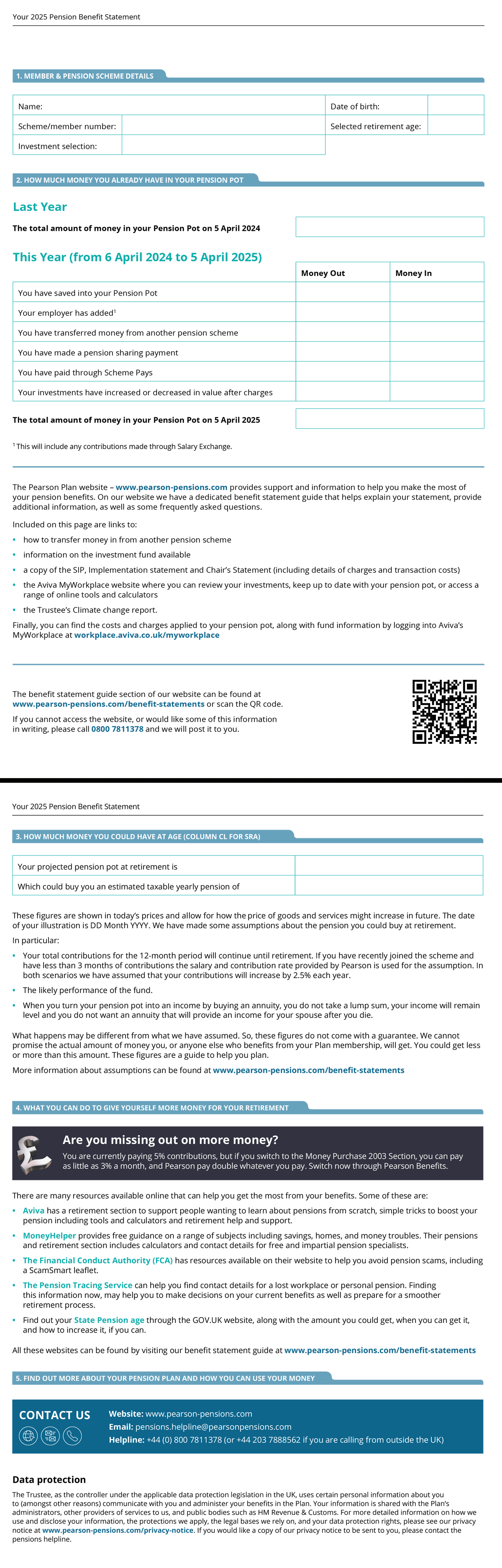 Selected retirement ageYour employer has addedChange in value of investmentsYour project pension pot at retirementWhich could buy you an estimate taxable yearly pension of
What assumptions have been made?
Click here to view the full assumptions used to calculate your pension. The figures are shown in ‘today’s prices’ and allow for how the price of goods and services might increase in future.
What actually happens may be different from what we have assumed. So, these figures do not come with a guarantee. We cannot promise this is the actual amount of money you, or anyone else who benefits from your Plan membership, will get. You could get less or more than this amount. These figures are a guide to help you plan.
Frequently asked questions
We have put together some common questions we are asked about the pensions benefit statements.
- What period does the benefit statement cover?
The benefit statement year falls between the tax year dates i.e. 6 April to 5 April every year.
- Who gets a benefit statement?
You will receive a benefit statement if you:
- Are an active DB member where you are still employed and making contributions to the Plan.
- Have a DC pension pot in either the MP03 or AE Sections.
- Have an AVC or Single Payment pension pot(s)
If you are a deferred DB member, you will not receive a statement for your DB benefits but you will still receive a statement for any AVCs.
If you have a DC pension pot (in MP03, AE or AVCs) and you are less than 12 months from your selected retirement age, a projected benefit will not be shown on your statement.
If you are less than 12 months from retirement, we are offering a free one to one guidance call with financial specialists, Wealth at Work. The number to call is 0800 0931462.
- How can I increase my pension pot?
Before doing anything, it is worth thinking about how much money you will need when you stop working. Take a look at the Aviva retirement planner - This link opens in a new browser window to give you an idea.
If you are an active employee, there are many ways to increase how much money you save. Take a look at the Ways you can save more page.
If you are in the DB Section, you cannot change the amount that you pay but you can save more in Additional Voluntary Contributions (AVCs).
- How do I change my retirement date?
If you are in the MP03 Section, the AE Section, or have AVCs in the Plan, you can change your selected retirement date.
To change this, all you need to do is complete a Selected retirement age form.
If you are a DB member, you are unable to change your normal retirement date. For more information on early or late retirement, go to the Section Information area in the Library.
- Where am I invested and what charges do I pay?
It is a good idea to monitor your investments yourself by logging into MyWorkplace - This link opens in a new browser window. Once logged in, you can view your investments and see the charges that are applied.
- How do I change my investments?
Firstly, it is worth understanding how your money grows. If you then decide to make any changes to your investment options, visit Aviva’s secure App or online portal, MyWorkplace at: workplace.aviva.co.uk/myworkplace
Once you are logged in to MyWorkplace follow the steps below to find the fund switch form:
- Go to Funds and Investments
- Then click Find out more about changing investments
- Once you have been redirected to their Membersite, go to Update investments
- Then fill in the details under Updating your investment details and click Update investment details.
If you need any further help, please contact the pensions team on pensions.helpline@pearsonpensions.com
- What about other income in retirement?
Other than your Pearson pension there is also the State Pension - This link opens in a new browser window that can help boost your income in retirement. You can check when you are able to take your State Pension - This link opens in a new browser window and how much you might be entitled to online.
- Have you thought about ‘old’ pension pots?
Have you considered combining pensions from previous employers? You may have had other jobs before Pearson, and may have therefore lost track of some pension pots. You can track them down online using the Pension Tracing Service - This link opens in a new browser window.
If you work for Pearson and would like to investigate whether you can transfer other pension benefits into the Plan, complete the Transfer in information request form.
It is important that you consider taking independent financial advice before you transfer your benefits so you understand how the benefits provided by the Plan may differ from the benefits in your other pension arrangements.
- Do I need to take financial advice yet?
We would recommend that you seek independent financial advice when you are deciding what your options are nearer to retirement. However, if you decide to make a large transfer between a DB and DC pension arrangement of £30,000 or more, you will need to prove that you have received independent financial advice. To read more please visit our Additional check when you take your benefits our transfer out of the Plan page. You can find an independent adviser in your area on the MoneyHelper - This link opens in a new browser window website. You will have to pay for the advice or services that you receive from the adviser.
If you are over 50 and have a Defined Contribution (DC) pension, Pension Wise - This link opens in a new browser window offers appointments to talk through your retirement options.
- How do I check which section of the Plan I am in?
You can find your section name at the top of your statement page. Alternatively, you can click here to find out what section you are in.
- What does Safeguarded benefits mean?
You may also have some additional wording on your statement referring to safeguarded benefits. For more information please download the Safeguarded benefits (PDF 170KB) leaflet.
Please note that the uplifted transfer value shown is not guaranteed.
- Why does my pension look lower this year?
As of 5 April 2025, global stock markets, particularly in the United States, fell in value. Since your pension pot include funds that track these markets, this affected the value of your pension pot at that time.
- Should I be worried about this drop in value?
Not necessarily. Pensions are long-term investments, and it is expected that values will go up and down over time. What matters most is how your pension performs over the long run, not short-term changes.
- Has my money been lost?
No. The value of your pension pot reflects the current market value of your investments. It has not been lost; it is just temporarily lower due to market conditions. As markets recover, so should the value of your pension pot.
- Can I do anything to protect my pension?
If you are unsure about your investment choices or how much you are contributing, it might be worth speaking to a financial adviser. Otherwise, staying invested and regularly reviewing your pension is usually a good approach.
- Where can I see the most up-to-date value of my pension?
You can log into Aviva’s secure member site, MyWorkplace, at any time to check the current value of your pension pot and see how it is performing.
Top tips to get the most out of your pension
- Make sure you know how to identify a scammer so you can be Scamsmart. Visit our Pension Scams page for tips and more information.
- Ensure all your personal information is up to date. Just complete our online change of details form if any of your personal details change.
- If you are a member of the MP03 or AE Sections, get into the habit of checking your pension pot value at least once a month. You can check this regularly through Aviva’s secure online portal, MyWorkplace - This link opens in a new browser window.
- If you are an active member of the AE Section, consider switching to the MP03 Section where Pearson will pay more into your pot. To find out more visit My Contributions.
- Make sure you complete an Expression of wish form if you have not already or if your circumstances have changed.
- Read your pension benefit statement carefully – it can help you make decisions about whether you want to amend your investments or contribute more.
- Consider taking independent financial advice if you are near retirement or if you want to transfer your benefits. You can find an independent adviser in your area on the Money Helper website - This link opens in a new browser window. You will have to pay for the advice or services that you receive from the adviser.
- If you’d like to find about more about the Plan or about pensions in general, visit the Information Centre.
Still have questions?
The easiest way is to visit Contact Us. Alternatively, you can email us at: pensions.helpline@pearsonpensions.com. You can also call us on 0800 7811378 (+44 203 7888562 if calling from outside the UK).